Yamaha DM2000: REAPER Control Surface Plugin
Native REAPER control surface plugin for the Yamaha DM2000. Bidirectional 24-channel HUI with transport, VU meters, scribble strips, and AUTOMIX integration.
v0.9 · Windows x64 · macOS arm64/x86_64
The DM2000 has been a workhorse console in professional studios since 2002, but REAPER integration has always been partial: three instances of the built-in HUI driver, no scribble strips, no meter bridge, no transport LEDs. This plugin provides a single native control surface that handles 24 channels across all four USB HUI ports simultaneously, adds bidirectional VU metering, channel name display, AUTOMIX mode integration, surround pan control, encoder-driven sends, bidirectional scene recall, master-section status readouts, and fully configurable User Defined Keys. It is the first open-source REAPER csurf specifically written for this console.
What works:
- 24-channel bidirectional fader control with touch automation
- Mute, solo, rec-arm, select buttons and LEDs
- Transport (play, stop, record, rewind, forward, RETURN TO ZERO, END, LOOP) with LEDs; all switch positions hardware-verified; REW and FF auto-repeat when held
- LOOP button LED tracks REAPER’s repeat state
- Jog wheel scrub (speed-scaled)
- BACK button → undo; FORWARD button → redo
- Pan knob input and ring-LED feedback
- VU meters on channel strips (HUI meter messages, 100 ms poll, 3-cycle peak hold, red OVER above 0 dBFS)
- LED counter display – timecode position sent to the DM2000’s front-panel LED counter at configurable rate (default 33 ms ≈ 30 Hz; hardware-verified 2026-06-15; delta BCD encoding)
- 4-char scribble strip names (HUI)
- Channel names via Yamaha SysEx – code written (format captured from Studio Manager), not yet active (port 8 output not wired in config dialog). Hardware-verified: scribble strip displays 4 chars only in DAW mode regardless of what is sent.
- AUTOMIX mode integration – the section sets the selected tracks’ automation mode (Trim / Read / Touch / Latch / Write) with LED feedback (ABORT → Touch; undo is on the BACK button, not AUTOMIX)
- Bank switching (channel ±1, bank ±24)
- Cursor cluster: INC/DEC = next/previous marker; QUICK PUNCH = insert marker at edit cursor; ENTER toggles cursor arrows between two modes – scroll (NAVIGATION) and zoom (ZOOM)
- Locate section and USER DEFINED KEYS (all 16 UDK buttons) fully configurable via
dm2000_keys.ini– Locate buttons, LM 1-8, and UDK 1-16 all read REAPER action IDs from the ini file. Downloaddm2000_keys.inifrom the release page; see dm2000_keys_guide.md for the full reference. - Per-channel AUTO key cycles that track’s automation mode (Read → Touch → Latch → Write), with a colour indicator that blinks in Latch; double-tapping a fader snaps it to 0 dB (both configurable via
[channel]) - Encoder sends – the AUX SELECT 1-5 buttons switch the channel encoders to ride REAPER track send levels, with V-pot ring feedback (the rings blink to distinguish send mode from pan) and the destination shown on the strips; ENC PAN returns to pan
- Per-channel status icons – INS lights when a track has FX, AUTO lights for any active automation mode (green = Read, orange = Touch/Latch, red = Write)
- Scribble peeks – hold ENC ASSIGN 1 to overlay each track’s number, ENC ASSIGN 2 for each fader’s level in dB; release to restore names
- Master-section readouts – SELECT ASSIGN tracks the encoder mode (Pan / SndA-E) and CURSOR MODE shows NAVIGATION / ZOOM, both recovered by sniffing Pro Tools’ own traffic
- Startup splash on the REMOTE display, and a clean LED/display shutdown on close
- Scrub wheel speed 10×; jog wheel unchanged
- Scene recall (bidirectional, hardware-verified 2026-06-16) – a DM2000 scene recall jumps REAPER to the matching marker;
#SCENEproject markers drive the console’s scenes as playback crosses them – recall while playing, scroll-only while stopped. Configured via[scene]indm2000_keys.iniand a dedicated GENERAL port set in the config dialog. Optional; does nothing unless enabled. - Surround pan via MCS PANNER (port 4, hardware-verified 2026-06-16) – DYNAMICS knobs and surround joystick drive a surround plugin on the selected track; ROUTING buttons 1-8 select the surround object with LED feedback. Ships targeting ReaSurroundPan; fully configurable via
[surround]indm2000_keys.ini. - Generic FX parameter editor – EFFECTS/PLUG-INS section browses FX slots and bypasses; parameter knobs 1-4 nudge the current page of parameters with the SEL rings showing their values; page arrows scroll through all parameters; the EFFECTS DISPLAY button toggles the knob auto-float on/off (turning a knob then floats the window); the PARAM/F4 button floats it directly.
- FLIP (FADER MODE button, v0.9) – while the channel encoders ride a send, FLIP swaps them: the motorized faders ride the selected send (with the calibrated taper) and the encoders/rings ride volume; press again to swap back. Configurable via
[fader] flip. - 2×40 display overlays (v0.9) – the console’s big REMOTE display momentarily shows context, then reverts to the FX view: the full track name on SEL (vs the 4-char strip), the FX name + parameter bank + the four current param names on FX-slot/page change, the scene/marker name on recall, and the send destination on AUX SELECT. Each configurable via
[display]. - Polish/accented track names (v0.9) – non-ASCII scribble names are transliterated to ASCII (ł→l, ó→o, ż→z, é→e) so they display meaningfully instead of being dropped.
Get it
Download the latest release from GitHub or GitLab.
Windows: copy reaper_csurf_dm2000_x64.dll to %APPDATA%\REAPER\UserPlugins\.
macOS: copy reaper_csurf_dm2000.dylib to ~/Library/Application Support/REAPER/UserPlugins/ (rename the downloaded versioned file). Universal binary (arm64 + x86_64), hardware-verified on both Intel and Apple Silicon.
Copy dm2000_keys.ini to ~/Library/Application Support/REAPER/ (Windows: %APPDATA%\REAPER\). This file configures Locate Memory buttons, USER DEFINED KEYS, surround pan mapping, counter refresh rate, and scene recall; without it, only RTZ and END work.
Restart REAPER after copying.
Console setup: SETUP → MIDI/HOST SETUP on the DM2000, set Remote Layer 1 target to Pro Tools and DAW to USB 1-4. See the README for full configuration steps and REAPER port setup.
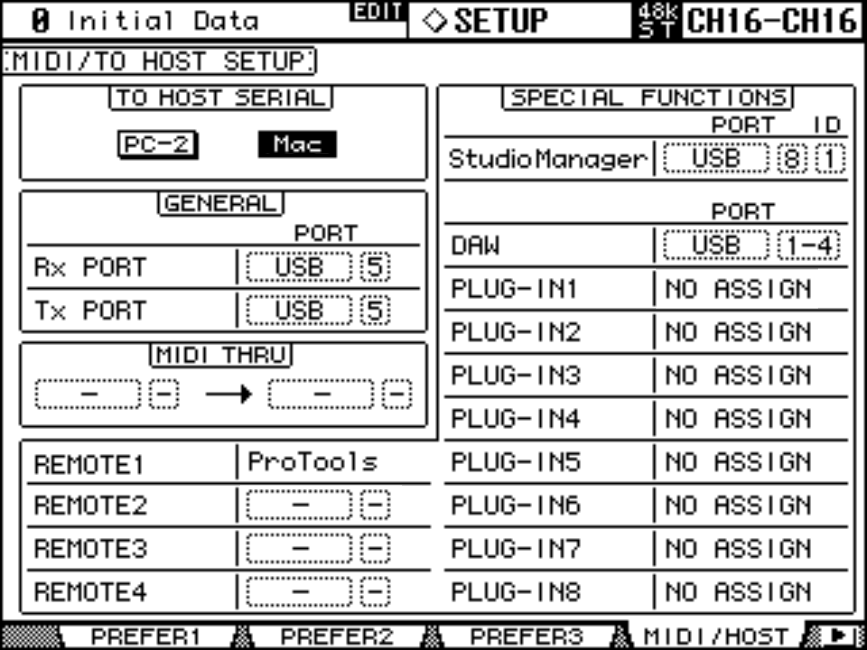
DM2000 MIDI/HOST SETUP -- Remote Layer 1 set to Pro Tools, DAW ports assigned to USB 1-4.
To build from source: Visual Studio 2019+, REAPER Extension SDK, instructions in the README.
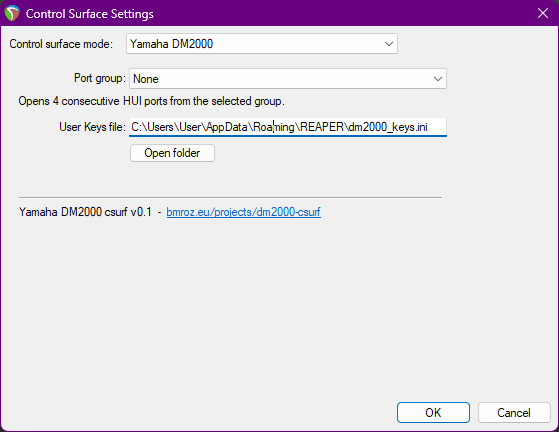
Windows
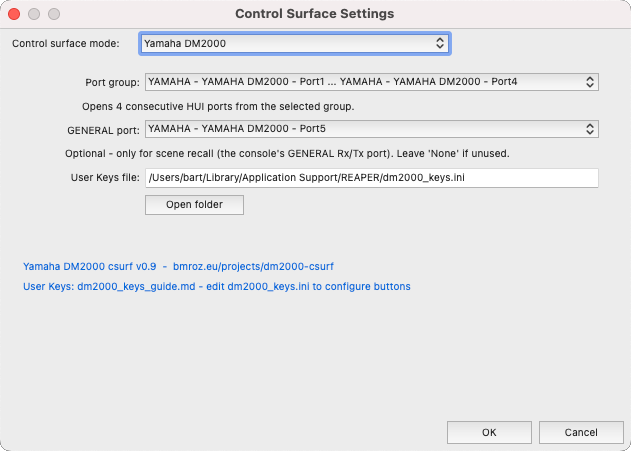
macOS
REAPER control surface configuration -- "Yamaha DM2000" with four HUI port inputs and User Keys file path.
Fader calibration
The mapping between REAPER’s gain and the console’s printed scale is calibrated against the hardware rather than assumed. The console’s built-in fader calibration utility was run first to normalize all motorized faders, then every silk-screened mark was captured with MIDI-OX as a 14-bit wire value. An 11-point piecewise-linear curve was fitted from those measurements: −∞, −50, −40, −30, −20, −15, −10, −5, 0, +5, and +10 dBFS. The taper is linear (1600 wire units per 5 dB) from −30 dB up to the physical maximum at the printed +10 mark (wire value 16383); REAPER volumes above +10 dB clamp there, so the dB shown in REAPER matches the mark under the fader cap throughout the throw.
Roadmap
- Talkback / control-room control – the DM2000’s talkback, slate, dim, mono and stereo-master sections transmit native Yamaha SysEx (not HUI) on the GENERAL port; a hardware-captured map exists, so these can drive REAPER monitoring actions.
- Scene recall: full SysEx scene dump/restore (reading/writing an entire scene’s contents)
EQ from the console’s SELECTED CHANNEL knobs turned out not to be possible: those knobs drive the DM2000’s own onboard EQ, not the DAW remote layer, so they transmit nothing usable on any port (re-confirmed by an all-ports sniff). Assign ReaEQ to the FX parameter editor to mix EQ from the surface instead.
For the full button/zone/MIDI protocol reference – every control, HUI zone number, switch index, direction, and hardware verification status – see the button/function/MIDI reference table in DESIGN.md.
For issues and feature requests, open a ticket on GitLab or GitHub.